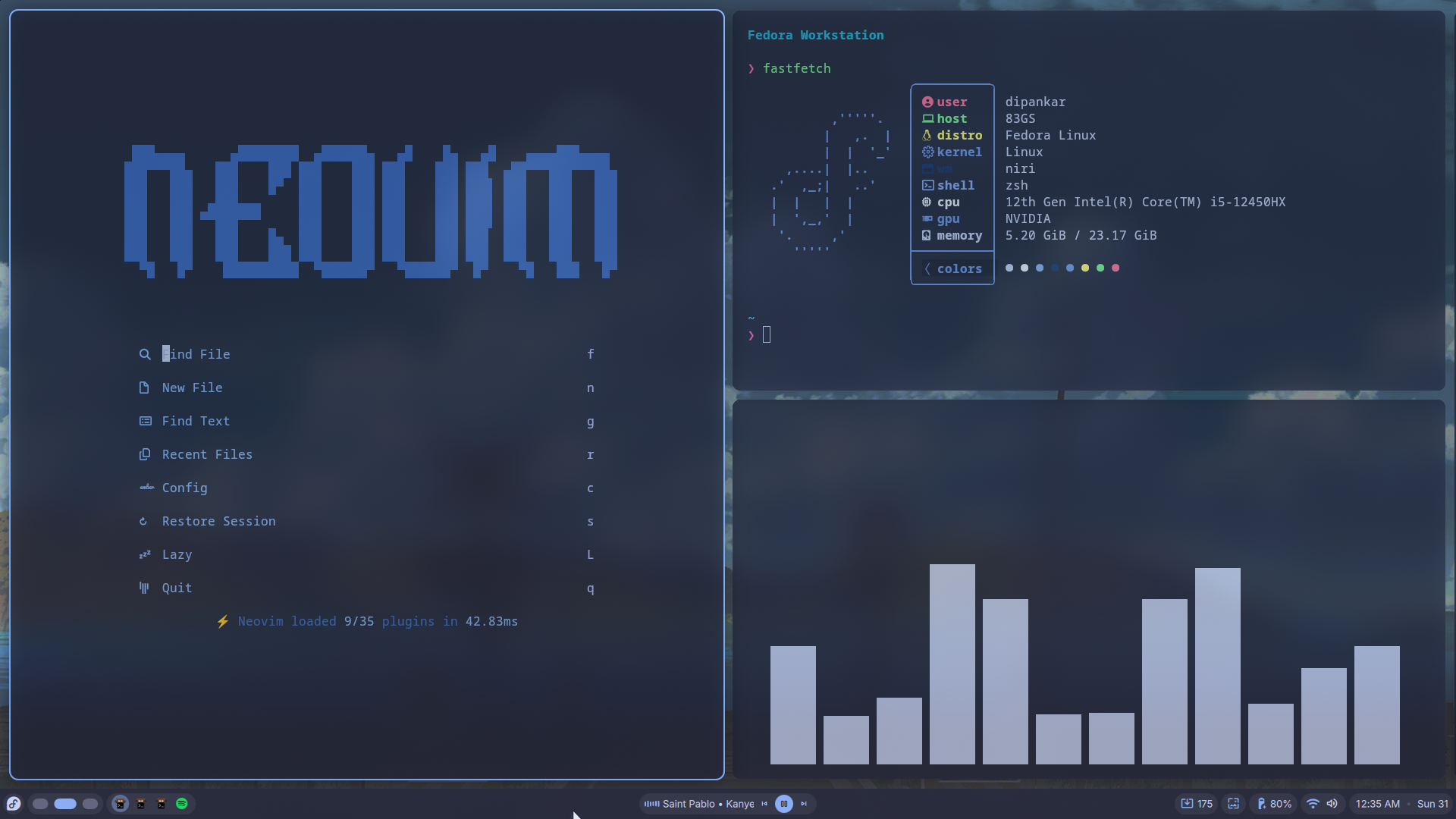
My Fedora + Niri Setup: Building a Minimalist Development Environment
Introduction
Your development environment is more than just a collection of tools—it's the interface between your ideas and the code you write. Every unnecessary click, every slow application launch, and every context switch adds friction to the development process.
Over the last few years, I've experimented with different operating systems, desktop environments, editors, and terminal workflows. Eventually, I settled on Fedora Linux paired with Niri, a scrollable tiling Wayland compositor, and a terminal-centric workflow built around Neovim, Tmux, and Zsh.
This setup prioritizes three things:
- Speed
- Consistency
- Minimal distractions
The result is a development environment that feels lightweight, efficient, and enjoyable to use every day.
Why Fedora?
I chose Fedora because it strikes an excellent balance between modern software and system stability.
Unlike some conservative distributions that ship older package versions, Fedora generally provides newer kernels, updated drivers, and modern development tooling without requiring extensive manual configuration.
Some reasons I prefer Fedora:
- Frequent updates without feeling unstable
- Excellent Wayland support
- Strong developer ecosystem
- Reliable package management through DNF
- Great hardware compatibility
- First-class support for modern Linux technologies
As someone who works across web development, competitive programming, robotics projects, and full-stack applications, having access to recent software versions is important.
Fedora allows me to stay current without sacrificing reliability.
Why Niri Instead of Hyprland?
Many Linux enthusiasts choose Hyprland when moving to Wayland, and for good reason. It looks beautiful and provides an impressive feature set.
However, I eventually moved to Niri.
Niri introduces a concept called scrollable tiling, where windows exist in an infinite horizontal workspace. Instead of constantly managing workspaces and rearranging layouts, I simply keep opening applications and scroll through them naturally.
This workflow feels surprisingly intuitive.
Benefits I've noticed:
- No workspace micromanagement
- Predictable window placement
- Efficient keyboard navigation
- Better focus on active tasks
- Simpler mental model compared to traditional tiling
A typical development session might look like:
- Browser with documentation
- Neovim
- Terminal running backend services
- Database console
- Git monitoring terminal
- Spotify
All of these can exist in a single scrollable workflow without feeling cluttered.
The Core Philosophy
My setup follows a simple principle:
The keyboard should be the primary interface.
The mouse still has its place, but most daily operations can be performed without touching it.
Examples include:
- Launching applications
- Switching windows
- Managing terminals
- Opening projects
- Git operations
- File navigation
- Searching codebases
Reducing mouse usage significantly decreases context switching and keeps my focus on development.
The Terminal-Centric Workflow
The terminal is where most of my work happens.
Rather than relying on multiple graphical applications, I keep everything centralized inside a terminal environment.
Kitty
My terminal emulator of choice is Kitty.
Reasons:
- GPU accelerated rendering
- Extremely responsive
- Modern feature set
- Great font rendering
- Excellent Wayland support
Even with multiple terminal sessions open, Kitty remains lightweight and fast.
Zsh + Starship
The shell is powered by Zsh with the Starship prompt.
Starship provides:
- Git branch information
- Language version indicators
- Directory status
- Fast rendering
The prompt remains minimal while still exposing useful context.
A quick glance tells me:
- Which repository I'm in
- Current branch
- Runtime versions
- Command execution status
Tmux
Tmux is one of those tools that becomes difficult to live without once adopted.
I use it for:
- Persistent development sessions
- Splitting terminal panes
- Running background processes
- Remote server workflows
A typical project session might include:
- Frontend server
- Backend server
- Database logs
- Git commands
- Testing pane
All within a single Tmux workspace.
The biggest advantage appears when working over SSH. Disconnecting from a remote server no longer means losing running processes.
Everything remains exactly where I left it.
Neovim: My Primary Editor
At the center of my workflow is Neovim.
My configuration is heavily customized using Lua and built around modern plugins.
Features I rely on daily:
- LSP support
- Autocompletion
- Syntax highlighting
- Git integration
- File explorer
- Fuzzy finding
- Terminal integration
For the technologies I frequently use:
- React
- Next.js
- TypeScript
- JavaScript
- Python
- C++
- Go
Neovim provides an experience comparable to traditional IDEs while remaining significantly lighter.
The modal editing model also reduces unnecessary hand movement, allowing faster navigation and editing.
Development Stack
Most of my current projects revolve around:
Web Development
- Next.js
- React
- TypeScript
- Tailwind CSS
- Supabase
- Firebase
Recent projects include:
- A music streaming platform
- Scheduling applications
- AI-assisted web applications
- Skill exchange platforms
Systems Programming
I also spend time working with:
- Go
- C
- C++
- Linux tooling
Competitive programming and DSA practice have pushed me toward lightweight tooling where compilation and execution happen directly from the terminal.
Robotics and Embedded Systems
My background also includes projects involving:
- Arduino
- IR sensors
- Line-following robots
- Electronics prototyping
Having a Linux environment simplifies working with serial devices and embedded toolchains.
Customization and Aesthetics
One thing I appreciate about Linux is the ability to build an environment that feels personal.
My setup focuses on:
- Clean typography
- Consistent color themes
- Minimal visual clutter
- Fast animations
- Functional layouts
The goal isn't to create a flashy desktop.
The goal is to create an environment that disappears while I work.
A good setup should feel invisible.
Why This Setup Works for Me
Many developers spend years searching for the "perfect" setup.
I've learned that perfection doesn't exist.
What matters is finding tools that align with how you think and work.
For me, Fedora + Niri provides:
- Modern Linux infrastructure
- Excellent Wayland support
- Efficient window management
- A keyboard-driven workflow
- Minimal distractions
Combined with Kitty, Zsh, Starship, Tmux, and Neovim, it creates an environment where I can focus entirely on solving problems instead of managing tools.
Final Thoughts
A development environment won't magically make you a better engineer.
Algorithms still need to be learned. Systems still need to be designed. Projects still need to be built.
However, a well-crafted workflow removes friction from those activities.
After countless experiments with distributions, desktop environments, editors, and terminal setups, Fedora and Niri have become the combination that best fits the way I work.
It's fast, modern, keyboard-centric, and stays out of the way.
And ultimately, that's exactly what I want from my tools.